About Steel Profiles
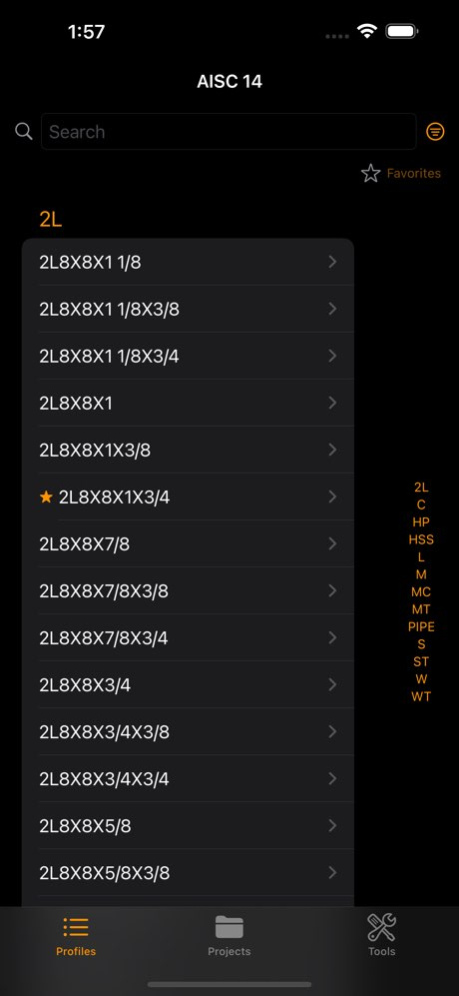
Steel Profiles is a comprehensive reference tool for structural engineers, steel fabricators, and construction professionals. Browse cross-section properties for over 5,000 steel shapes from six international standards....
Steel Profiles is a comprehensive reference tool for structural engineers, steel fabricators, and construction professionals. Browse cross-section properties for over 5,000 steel shapes from six international standards. WHAT'S NEW IN 2.0 - AISC 16 library with 2,299 sections from the 16th Edition Steel Construction Manual - Equivalent Finder: find the closest matching section in a different standard - Profile Comparison: compare up to 3 profiles side by side - Weight Calculator with multiple projects and folder organization - Advanced filters by area, weight, inertia, moduli, and radii of gyration - Favorites: swipe to save, filter to show favorites only - Spotlight search and Siri Shortcuts - Unit Converter for 8 engineering categories FEATURES - Browse and search steel shapes by name or properties - View complete geometric and structural properties with descriptions - Detailed cross-section drawings - Export and share weight lists - Dark mode support - Designed for iPhone, iPad, and Mac LIBRARIES USA: - AISC 16 & AISC 16 SI - 16th Edition (W, M, S, HP, C, MC, L, WT, MT, ST, HSS, Pipe) - AISC 14 & AISC 14 SI - 14th Edition (all shapes) Canada: - CISC 92 (all shapes) Europe: - IPE, IPEA, IPEAA, IPEO, HD, IPN, HE, HEA, HEAA, HEB, HEM, HL, HP, UPE, UPN, L, T - Hot-rolled and cold-formed hollow sections (EN 10210, EN 10219) United Kingdom: - UB, UC, UBP, J, PFC, T, CH, L - Hot-rolled and cold-formed hollow sections (BS EN 10210, BS EN 10219) Australia / New Zealand: - AS/NZS (all shapes) Free download includes dimension properties. Unlock full properties per library or get All Libraries for complete access.
Version History - NEW: AISC 16 / AISC 16 SI library — 2,299 sections from the 16th Edition Steel Construction Manual - NEW: Spotlight search — find steel profiles from your home screen - NEW: Siri Shortcuts — "Show me HEB 300 in Steel Profiles" - NEW: Japanese, Portuguese, and Chinese translations - Favorites: swipe to save, filter to show favorites only - Compare up to 3 profiles side by side - Find Equivalent: search for the closest matching section in a different standard library - Weight calculator: profile x length x quantity = total weight, with shareable weight list - Multiple projects: create, rename, and organize projects into folders - Add profiles to projects directly from the project detail view - Edit weight items: modify length and quantity of existing items - Select profiles in projects to compare or find equivalents instantly - Advanced filters: filter by area, weight, inertia, moduli, radii of gyration - Improved VoiceOver accessibility and Dynamic Type support - Smooth animations for favorites, filters, and tab switching - macOS: redesigned sidebar with Profiles/Projects tabs and inline library picker - Improved performance and modern interface 2.0.2 Mar 28 - NEW: AISC 16 / AISC 16 SI library — 2,299 sections from the 16th Edition Steel Construction Manual - NEW: Spotlight search — find steel profiles from your home screen - NEW: Siri Shortcuts — "Show me HEB 300 in Steel Profiles" - NEW: Japanese, Portuguese, and Chinese translations - Favorites: swipe to save, filter to show favorites only - Compare up to 3 profiles side by side - Find Equivalent: search for the closest matching section in a different standard library - Weight calculator: profile x length x quantity = total weight, with shareable weight list - Multiple projects: create, rename, and organize projects into folders - Add profiles to projects directly from the project detail view - Edit weight items: modify length and quantity of existing items - Select profiles in projects to compare or find equivalents instantly - Advanced filters: filter by area, weight, inertia, moduli, radii of gyration - Improved VoiceOver accessibility and Dynamic Type support - Smooth animations for favorites, filters, and tab switching - macOS: redesigned sidebar with Profiles/Projects tabs and inline library picker - Improved performance and modern interface 2.0.0 Mar 20 - Bug fixes 1.3.1 06/12/2022 Buy steel profiles libraries right from the app! 1.3 06/11/2022 Updated for iOS11 1.2 09/26/2017 Bug fixes 1.1 09/18/2013 Now search results show additional data Added 'Contact support' and sharing options 1.0.2 10/12/2012 1.0.1 10/02/2012
Previous Versions
Here you can find the changelog of Steel Profiles since it was posted on our website on 2016-09-24 05:07:36.
The latest version is 2.0.2 and it was updated on 2026-10-12 18:11:54. See below the changes in each version.
Steel Profiles version 2.0.2
Updated At: 2026-10-08
Changes: Version History - NEW: AISC 16 / AISC 16 SI library — 2,299 sections from the 16th Edition Steel Construction Manual
- NEW: Spotlight search — find steel profiles from your home screen
- NEW: Siri Shortcuts — "Show me HEB 300 in Steel Profiles"
- NEW: Japanese, Portuguese, and Chinese translations
- Favorites: swipe to save, filter to show favorites only
- Compare up to 3 profiles side by side
- Find Equivalent: search for the closest matching section in a different standard library
- Weight calculator: profile x length x quantity = total weight, with shareable weight list
- Multiple projects: create, rename, and organize projects into folders
- Add profiles to projects directly from the project detail view
- Edit weight items: modify length and quantity of existing items
- Select profiles in projects to compare or find equivalents instantly
- Advanced filters: filter by area, weight, inertia, moduli, radii of gyration
- Improved VoiceOver accessibility and Dynamic Type support
- Smooth animations for favorites, filters, and tab switching
- macOS: redesigned sidebar with Profiles/Projects tabs and inline library picker
- Improved performance and modern interface 2.0.2 Mar 28 - NEW: AISC 16 / AISC 16 SI library — 2,299 sections from the 16th Edition Steel Construction Manual
- NEW: Spotlight search — find steel profiles from your home screen
- NEW: Siri Shortcuts — "Show me HEB 300 in Steel Profiles"
- NEW: Japanese, Portuguese, and Chinese translations
- Favorites: swipe to save, filter to show favorites only
- Compare up to 3 profiles side by side
- Find Equivalent: search for the closest matching section in a different standard library
- Weight calculator: profile x length x quantity = total weight, with shareable weight list
- Multiple projects: create, rename, and organize projects into folders
- Add profiles to projects directly from the project detail view
- Edit weight items: modify length and quantity of existing items
- Select profiles in projects to compare or find equivalents instantly
- Advanced filters: filter by area, weight, inertia, moduli, radii of gyration
- Improved VoiceOver accessibility and Dynamic Type support
- Smooth animations for favorites, filters, and tab switching
- macOS: redesigned sidebar with Profiles/Projects tabs and inline library picker
- Improved performance and modern interface 2.0.0 Mar 20 - Bug fixes 1.3.1 06/12/2022 Buy steel profiles libraries right from the app! 1.3 06/11/2022 Updated for iOS11 1.2 09/26/2017 Bug fixes 1.1 09/18/2013 Now search results show additional data
Added 'Contact support' and sharing options 1.0.2 10/12/2012 1.0.1 10/02/2012
Steel Profiles version 2.0.2
Updated At: 2026-09-03
Changes: Version History - NEW: AISC 16 / AISC 16 SI library — 2,299 sections from the 16th Edition Steel Construction Manual
- NEW: Spotlight search — find steel profiles from your home screen
- NEW: Siri Shortcuts — "Show me HEB 300 in Steel Profiles"
- NEW: Japanese, Portuguese, and Chinese translations
- Favorites: swipe to save, filter to show favorites only
- Compare up to 3 profiles side by side
- Find Equivalent: search for the closest matching section in a different standard library
- Weight calculator: profile x length x quantity = total weight, with shareable weight list
- Multiple projects: create, rename, and organize projects into folders
- Add profiles to projects directly from the project detail view
- Edit weight items: modify length and quantity of existing items
- Select profiles in projects to compare or find equivalents instantly
- Advanced filters: filter by area, weight, inertia, moduli, radii of gyration
- Improved VoiceOver accessibility and Dynamic Type support
- Smooth animations for favorites, filters, and tab switching
- macOS: redesigned sidebar with Profiles/Projects tabs and inline library picker
- Improved performance and modern interface 2.0.2 Mar 28 - NEW: AISC 16 / AISC 16 SI library — 2,299 sections from the 16th Edition Steel Construction Manual
- NEW: Spotlight search — find steel profiles from your home screen
- NEW: Siri Shortcuts — "Show me HEB 300 in Steel Profiles"
- NEW: Japanese, Portuguese, and Chinese translations
- Favorites: swipe to save, filter to show favorites only
- Compare up to 3 profiles side by side
- Find Equivalent: search for the closest matching section in a different standard library
- Weight calculator: profile x length x quantity = total weight, with shareable weight list
- Multiple projects: create, rename, and organize projects into folders
- Add profiles to projects directly from the project detail view
- Edit weight items: modify length and quantity of existing items
- Select profiles in projects to compare or find equivalents instantly
- Advanced filters: filter by area, weight, inertia, moduli, radii of gyration
- Improved VoiceOver accessibility and Dynamic Type support
- Smooth animations for favorites, filters, and tab switching
- macOS: redesigned sidebar with Profiles/Projects tabs and inline library picker
- Improved performance and modern interface 2.0.0 Mar 20 - Bug fixes 1.3.1 06/12/2022 Buy steel profiles libraries right from the app! 1.3 06/11/2022 This app has been updated by Apple to prepare for watchOS 27 compatibility. No new features are included.
Updated for iOS11 1.2 09/26/2017 Bug fixes 1.1 09/18/2013 Now search results show additional data
Added 'Contact support' and sharing options 1.0.2 10/12/2012 1.0.1 10/02/2012
Steel Profiles version 2.0.2
Updated At: 2026-08-21
Changes: Version History - NEW: AISC 16 / AISC 16 SI library — 2,299 sections from the 16th Edition Steel Construction Manual
- NEW: Spotlight search — find steel profiles from your home screen
- NEW: Siri Shortcuts — "Show me HEB 300 in Steel Profiles"
- NEW: Japanese, Portuguese, and Chinese translations
- Favorites: swipe to save, filter to show favorites only
- Compare up to 3 profiles side by side
- Find Equivalent: search for the closest matching section in a different standard library
- Weight calculator: profile x length x quantity = total weight, with shareable weight list
- Multiple projects: create, rename, and organize projects into folders
- Add profiles to projects directly from the project detail view
- Edit weight items: modify length and quantity of existing items
- Select profiles in projects to compare or find equivalents instantly
- Advanced filters: filter by area, weight, inertia, moduli, radii of gyration
- Improved VoiceOver accessibility and Dynamic Type support
- Smooth animations for favorites, filters, and tab switching
- macOS: redesigned sidebar with Profiles/Projects tabs and inline library picker
- Improved performance and modern interface 2.0.2 Mar 28 - NEW: AISC 16 / AISC 16 SI library — 2,299 sections from the 16th Edition Steel Construction Manual
- NEW: Spotlight search — find steel profiles from your home screen
- NEW: Siri Shortcuts — "Show me HEB 300 in Steel Profiles"
- NEW: Japanese, Portuguese, and Chinese translations
- Favorites: swipe to save, filter to show favorites only
- Compare up to 3 profiles side by side
- Find Equivalent: search for the closest matching section in a different standard library
- Weight calculator: profile x length x quantity = total weight, with shareable weight list
- Multiple projects: create, rename, and organize projects into folders
- Add profiles to projects directly from the project detail view
- Edit weight items: modify length and quantity of existing items
- Select profiles in projects to compare or find equivalents instantly
- Advanced filters: filter by area, weight, inertia, moduli, radii of gyration
- Improved VoiceOver accessibility and Dynamic Type support
- Smooth animations for favorites, filters, and tab switching
- macOS: redesigned sidebar with Profiles/Projects tabs and inline library picker
- Improved performance and modern interface 2.0.0 Mar 20 - Bug fixes 1.3.1 06/12/2022 Buy steel profiles libraries right from the app! 1.3 06/11/2022 This update from Apple will improve the functionality of this app. No new features are included.
Updated for iOS11 1.2 09/26/2017 Bug fixes 1.1 09/18/2013 Now search results show additional data
Added 'Contact support' and sharing options 1.0.2 10/12/2012 1.0.1 10/02/2012
Steel Profiles version -
Updated At: 2025-09-26
Steel Profiles version 1.3.1
Updated At: 2022-06-12
Changes: - Bug fixes
Steel Profiles version 1.2
Updated At: 2017-09-26
Changes: Sep 26, 2017 Version 1.2
This app has been updated by Apple to use the latest Apple signing certificate.
Updated for iOS11
Steel Profiles version 1.2
Updated At: 2017-09-26
Changes: Sep 26, 2017 Version 1.2
Updated for iOS11
Steel Profiles version 1.2
Updated At: 2017-09-26
Changes: Sep 26, 2017 Version 1.2
This app has been updated by Apple to display the Apple Watch app icon.
Updated for iOS11
Steel Profiles version 1.2
Updated At: 1970-01-01
Changes: 2017年9月26日 Version 1.2
Updated for iOS11
Steel Profiles version 2.0.2
Updated At: 1970-01-01
Changes: - NEW: AISC 16 / AISC 16 SI library — 2,299 sections from the 16th Edition Steel Construction Manual
- NEW: Spotlight search — find steel profiles from your home screen
- NEW: Siri Shortcuts — "Show me HEB 300 in Steel Profiles"
- NEW: Japanese, Portuguese, and Chinese translations
- Favorites: swipe to save, filter to show favorites only
- Compare up to 3 profiles side by side
- Find Equivalent: search for the closest matching section in a different standard library
- Weight calculator: profile x length x quantity = total weight, with shareable weight list
- Multiple projects: create, rename, and organize projects into folders
- Add profiles to projects directly from the project detail view
- Edit weight items: modify length and quantity of existing items
- Select profiles in projects to compare or find equivalents instantly
- Advanced filters: filter by area, weight, inertia, moduli, radii of gyration
- Improved VoiceOver accessibility and Dynamic Type support
- Smooth animations for favorites, filters, and tab switching
- macOS: redesigned sidebar with Profiles/Projects tabs and inline library picker
- Improved performance and modern interface
Disclaimer
Official App Store Link
We do not host Steel Profiles on our servers. We did not scan it for viruses, adware, spyware or other type of malware. This app is hosted by Apple and passed their terms and conditions to be listed there. We recommend caution when installing it.
The App Store link for Steel Profiles is provided to you by apps112.com without any warranties, representations or guarantees of any kind, so access it at your own risk.
If you have questions regarding this particular app contact the publisher directly. For questions about the functionalities of apps112.com contact us.